
Download ScreenshotX – Free, Secure Windows Screenshot Tool with Advanced Annotation Features
Looking for a reliable, ad-free, and lightweight screenshot tool for Windows? ScreenshotX is a powerful freeware application designed to simplify the process of capturing, editing, and sharing screenshots. Whether you're a student, professional, or casual user, ScreenshotX delivers fast, accurate screen captures with intuitive controls.
With support for free-form snips, window captures, automatic screenshot balancing, and a built-in brush tool, this tool ensures you never miss a detail. The app also allows you to enhance your screenshots with custom backgrounds, color picking, and upcoming features like redaction tools, text annotations, and highlighters. Best of all, ScreenshotX runs natively on Windows without requiring registration, spyware, or intrusive ads.
Download ScreenshotX today and experience a clean, secure, and efficient way to capture your screen with ease.
Key Features of ScreenshotX – What Makes It Stand Out?
ScreenshotX isn't just another screenshot app—it’s a thoughtfully designed tool built with real user needs in mind. One of its standout features is the free area snip, which lets you select any portion of your screen with precision. Whether you're capturing a small section of a document or a complex UI layout, the flexible selection tool ensures accuracy. The window snip function allows you to capture entire application windows instantly, perfect for sharing software interfaces or troubleshooting guides.
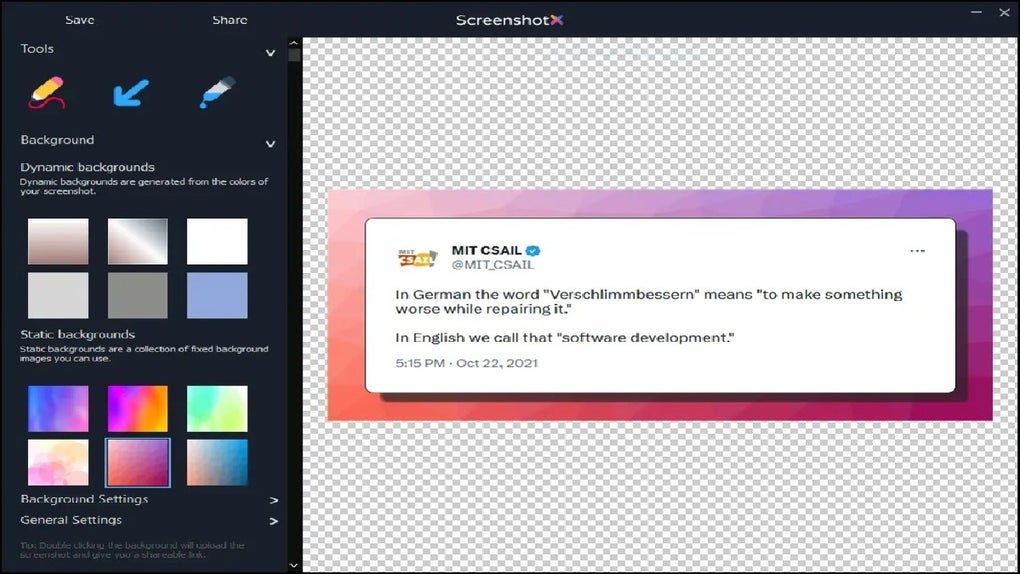
Another unique feature is automatic screenshot balancing, which intelligently adjusts the captured image to maintain visual harmony—ideal for presentations or tutorials where consistency matters. The ability to add a pretty background gives your screenshots a polished, professional look, especially useful for creating social media content or blog visuals. Built-in tools like the brush tool and color picker let you annotate directly on the screenshot, making it easy to point out details or emphasize key areas.
Looking ahead, ScreenshotX is set to introduce redaction tools for hiding sensitive data, text annotations, and highlighting features, making it a go-to solution for both personal and business use. These upcoming enhancements promise even greater functionality without cluttering the interface. With no registration, no ads, and no hidden tracking, ScreenshotX remains a trustworthy, secure, and lightweight tool that respects your privacy and system performance.
How to Install and Use ScreenshotX – Simple Steps for Every User
Getting started with ScreenshotX is quick and hassle-free. The app is distributed as a portable, free download for Windows, meaning you don’t need to install it through a traditional setup wizard. Simply visit the official website, download the .exe file, and run it directly. No admin rights are required, making it ideal for work computers or shared devices.
Once launched, ScreenshotX appears in your system tray. To take a screenshot, right-click the icon and choose from the available options: Free Area Snip, Window Snip, or Full Screen Snip. The interface is minimal and intuitive—click and drag to select your desired area, and the screenshot is captured instantly. After capture, the built-in editor opens automatically, where you can use the brush tool to draw, the color picker to match existing colors, or add text labels.
For enhanced visuals, use the background customization feature to apply gradients, solid colors, or even custom images. This is particularly useful when creating tutorials or marketing materials. Once satisfied, you can save the file in popular formats like PNG, JPG, or BMP, or copy it directly to the clipboard. ScreenshotX also supports automatic update checks, ensuring you always have the latest version with improved stability and new features.
Compatibility & System Requirements – Works on All Windows Devices
ScreenshotX is designed specifically for Windows operating systems, supporting Windows 7, 8, 8.1, and Windows 10/11. It’s lightweight, consuming minimal RAM and CPU resources, making it suitable for older machines or low-end laptops. The application is compatible with both 32-bit and 64-bit systems, ensuring broad accessibility across desktops, laptops, and tablets.
As a native Windows app, ScreenshotX integrates smoothly with the system, offering fast performance and reliable capture quality. It doesn’t require .NET Framework or additional runtime libraries, so you can run it immediately after download. While currently exclusive to Windows, the development team has hinted at future releases for Mac, Android, and iOS, which would expand its reach to users across platforms.
Security is a top priority—ScreenshotX is completely free from spyware, malware, and ads. The code is open for review, and all downloads come from the official source. This ensures a safe and transparent experience. Whether you're using it at home, in the office, or on the go, ScreenshotX delivers consistent performance across different screen resolutions and DPI settings.
Pros and Cons of Using ScreenshotX
- Pros:
- Completely free with no hidden costs or subscriptions
- Lightweight and fast—minimal impact on system performance
- Ad-free and spyware-free—privacy-focused design
- Intuitive interface with easy-to-use tools
- Automatic screenshot balancing for consistent visuals
- Supports custom backgrounds and annotations
- Portable—no installation required
- Regular updates with new features on the roadmap
- Cons:
- Currently only available for Windows (no Mac, Android, or iOS support yet)
- Limited editing tools compared to premium apps (e.g., no shape tools or advanced filters)
- No cloud sync or sharing integration (yet)
- Basic text tool—no font customization options currently
- Only supports local file saving (no direct upload to cloud services)
Frequently Asked Questions (FAQ)
Is ScreenshotX really free to download and use?
Yes. ScreenshotX is completely free to download, install (portable), and use. There are no ads, no registration, and no premium features locked behind a paywall. It’s a true freeware tool designed for everyday users.
Can I use ScreenshotX on Windows 11?
Absolutely. ScreenshotX is fully compatible with Windows 11, as well as Windows 10, 8.1, 8, and 7. It runs natively and performs well on all supported versions.
Does ScreenshotX support Mac or mobile devices?
Not yet. Currently, ScreenshotX is only available for Windows. However, the developers have announced plans to release versions for Mac, Android, and iOS in the near future.
How do I update ScreenshotX?
ScreenshotX includes automatic update checks. When a new version is available, you’ll receive a notification. Simply download the latest .exe file from the official site and replace the old one—no complex setup needed.
Can I edit my screenshots after capture?
Yes. After capturing a screenshot, ScreenshotX opens a built-in editor where you can use the brush tool, color picker, add text, and apply custom backgrounds. Future updates will include redaction, highlighting, and more advanced annotation tools.
Final Verdict: Why ScreenshotX Is a Must-Try for Windows Users
If you're searching for a secure, lightweight, and efficient screenshot tool for Windows, ScreenshotX delivers exactly what you need—without the clutter. Its combination of essential features, privacy-first design, and continuous development makes it a standout choice among freeware applications. Whether you're documenting a bug, creating a tutorial, or sharing a quick update, ScreenshotX simplifies the process with speed and elegance.
While it may lack some advanced features found in paid software, its simplicity and reliability more than make up for it. The upcoming additions like redaction and enhanced annotations promise even greater versatility. For users who value performance, privacy, and ease of use, ScreenshotX is an excellent free alternative to heavier, ad-laden tools.
Download ScreenshotX today and take control of your screen captures—fast, free, and without compromise.







